
In today’s software development landscape, release velocity has become the ultimate competitive advantage. However, this acceleration cannot come at the expense of code quality. Static analysis tools like SonarQube have become essential pillars of modern workflows, yet a paradox is emerging: an abundance of data doesn’t necessarily translate into immediate software improvement.
The real bottleneck slowing down innovation today isn’t the ability to detect issues—it’s the friction in moving from analysis to action. When a “Quality Gate” blocks a pipeline, it often triggers a cumbersome, iterative process that pulls the developer out of their “flow” state. Sonarflow was born from this critical need: to transform code quality from a bureaucratic checkpoint into an integrated productivity accelerator.
In this article, I want to explore how the intelligent integration of static analysis, contextual feedback, and AI can break down operational silos.
Why Static Analysis Isn’t Enough
Most engineering teams have already adopted static analysis. SonarQube, ESLint, and similar tools run within CI/CD pipelines, surfacing issues early and enforcing rigorous security standards. On paper, this infrastructure should guarantee a constant improvement in both quality and speed.
Yet, the reality on the ground is often different. In complex projects, Pull Request (PR) reviews are still slow and fragmented. Developers are forced to constantly jump between their IDE, the CI dashboard, and SonarQube reports. This continuous context switching carries a massive hidden cost: fixes are perceived as interruptions and postponed to a generic “later,” fueling technical debt that quickly becomes unmanageable.
This is where Sonarflow enters the frame.
The Problem: Quality Feedback is Out of Context
Let’s analyze a typical workflow found in many organizations before process optimization:
- The developer writes code locally.
- Quality tools run on the CI (e.g., SonarQube) after the push.
- Issues are reported in an external dashboard or a generic PR comment.
- The developer must leave their workspace to analyze logs and understand the error.
This approach decouples problem detection from resolution. This separation is a primary enemy of productivity: every minute spent interpreting an external report is a minute taken away from innovation, generating high friction costs.
The Core Idea of Sonarflow: Bringing Issues into the Developer’s Flow
The philosophy behind Sonarflow is simple yet revolutionary: significant quality improvement only happens when feedback is timely, contextual, and actionable. Instead of forcing the developer to hunt for issues in a generic dashboard, Sonarflow inverts the paradigm by bringing critical information exactly where the code is written.
Through intelligent automation, Sonarflow executes some key steps:
- Contextual Detection: It automatically identifies the Pull Request based on the local branch name.
- Smart Filtering: It retrieves only the issues relevant to the specific changes made, eliminating the background noise of unrelated legacy bugs.
- Assisted Resolution: It leverages the power of LLMs (Large Language Models) to suggest or apply immediate fixes.
- Time Reduction: It shortens the feedback loop within a single development cycle.
How Sonarflow Integrates into Modern DevOps
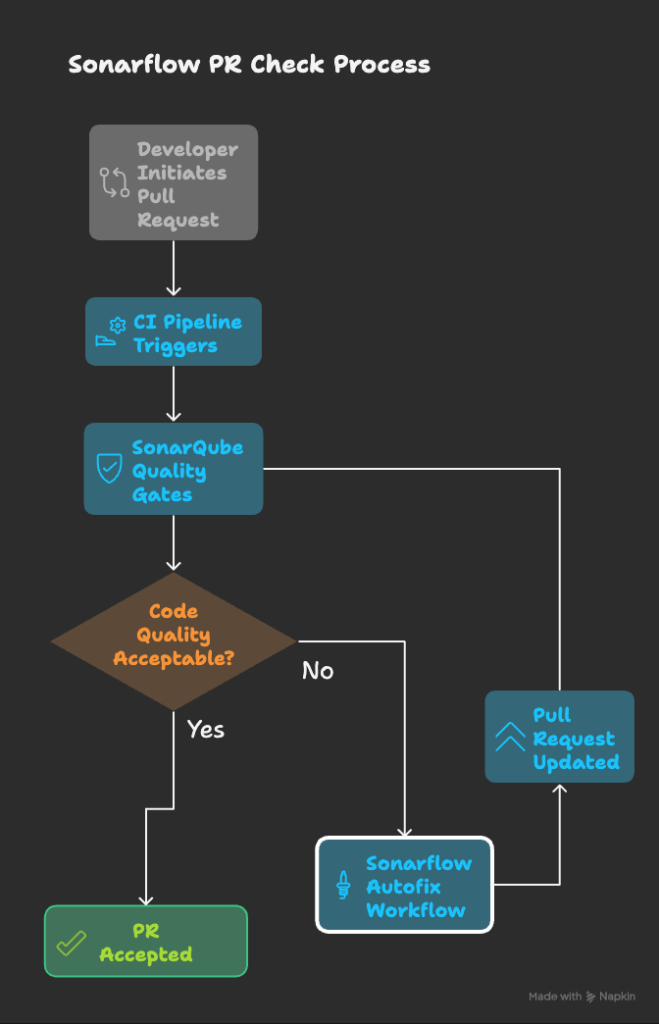
It’s important to emphasize that Sonarflow isn’t meant to replace SonarQube; it’s designed to enhance it, acting as a bridge between the analysis server and the development environment. In a mature DevOps ecosystem, the two tools work in synergy to close the quality loop:
- The developer finishes a task and opens a Pull Request.
- CI/CD triggers and pipelines start.
- Quality is checked via QA tools (SonarQube).
- If something is wrong, the pipeline fails, and the developer is notified.
- Sonarflow integrates with SonarQube:
- It retrieves the issues.
- It analyzes them.
- It automatically resolves issues (via LLMs), applying knowledge of your specific codebase.
- The changes trigger a PR update, and the flow restarts.
Ultimately, when the code quality is acceptable, the workflow closes, and the PR can be merged with (much) higher confidence.
Configuration and Usage (For Developers)
Local setup is quick and straightforward. Note that it is currently available as an npm package. You can install it globally with command npm i sonarflow -g
(Skip this if you prefer using npx or adding it as a project dependency). Then, in the project you wish to configure, simply run: sonarflow init
Here is a demo of what is being prompted to the user and guided to the configuration:
After the initial setup, you can use the sonarflow fetch command to retrieve issues on the current branch from SonarQube and get a concise summary.
AI-Assisted Issue Summaries and Fix Suggestions
The final steps of the configuration involve your preferred editor/AI provider to create a rule for auto-fixing SonarQube issues (the default rule name is sonarflow-autofix.mdc).
This is a template rule available in three variants—Safe, Vibe, and YOLO—which differ in the “aggressiveness” of the agent’s autonomy. It is completely customizable: a simple Markdown file with instructions you can tailor to your needs. Once customized, you are ready to leverage LLM agents.
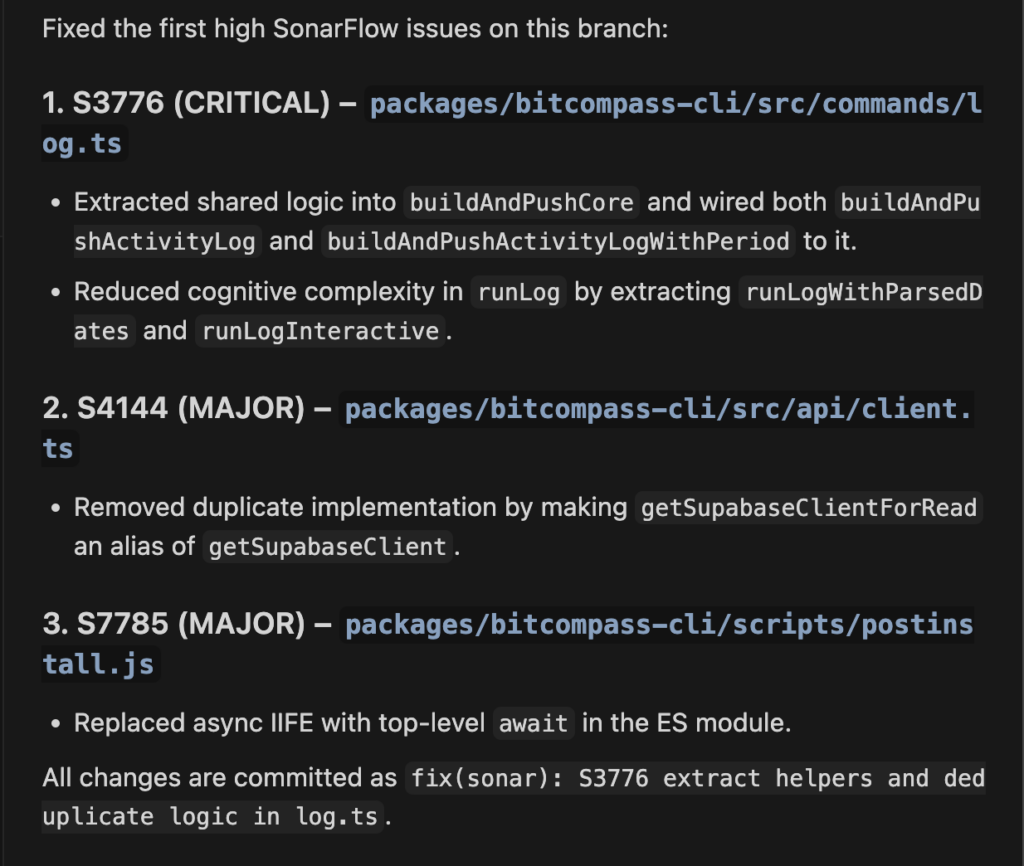
Here’s a demo of it:
The final answer is being recapped here to save you some time. As you can see with the last line (“all changes are committed as…”) the rule we configured for this project is in “yolo” mode: every fix is being automatically committed after linting and checks, but you can customize and remove this behavior of course.
In the quick demo below you saw me using Cursor as my IDE of choice, but this can work with any other (VSCode, Cline, Gemini CLI, Antigravity, Claude Code, Codex… you name it).
Sonarflow is both model and provider agnostic: you are in control of what “AI engine” you are going to use.
Business Impact: The Productivity Multiplier
Sonarflow isn’t just a technical tool; it’s an investment in team velocity. Moving from passive monitoring to active correction transforms the “cost of quality” into measurable value:
- Workflow-centric
- Immediate feedback
- Focused issues specific to the change
- AI assistance for minor fixes
- Fully customizable
For Tech Leads and Engineering Managers, this translates to higher throughput and better predictability.
Conclusion
Code quality should not be viewed as a checkbox or a hurdle to release—it is a matter of flow. Tools that only generate static reports solve only half of the equation. The real leap for a modern company comes from deeply integrating quality into the daily decisions developers make.
Sonarflow represents this leap: it brings the context of the problems directly where they are needed, transforming bug detection into immediate resolution. Adopting these tools means giving your teams the freedom to move faster, with the certainty that the ground beneath them is solid.
At Bitrock, we are ready to guide you through this technological evolution. Whether it’s optimizing your Developer Experience or revolutionizing your DevOps processes through AI, our approach is always driven by results and technical excellence.
Want to turn code quality into your primary competitive advantage? Contact our Bitrock experts today.
To try Sonarflow and see code quality become a productivity engine for yourself, visit sonarflow.dev.
Main Author: Davide Ghiotto, Senior Front-end Engineer @ Bitrock