

The era of Generative Artificial Intelligence has made AI Agents a ubiquitous tool. To fully exploit their potential, Agents must interact with the external world, performing specific actions such as sending emails, querying databases, or sending notifications.
This is where the MCP (Model Context Protocol) Server comes into play, a framework that exposes these features in a standardized and accessible way.
This technical article explores the concept of the MCP Server, discussed in the dedicated episode of our Bitrock Tech Radio podcast and in our article on Platform Shifting and the new MCP and A2A protocols, presenting a practical implementation in TypeScript that creates a direct communication channel to a personal Telegram account.
The Model Context Protocol (MCP)
The Model Context Protocol (MCP) is a communication protocol and a set of specifications that define a standardized way to expose tools, resources, and prompts to LLMs.
Essentially, MCP acts as a universal intermediary:
- Standardization: Defines a common format for describing capabilities (tools).
- Accessibility: Allows any compatible AI agent to discover and invoke these capabilities remotely.
- Extensibility: Allows developers to quickly integrate new capabilities (custom APIs, external services, internal logic) into the AI agent ecosystem.
The MCP Server
An MCP Server is an application that implements the MCP protocol. Its main function is to register, describe, and execute the tools it exposes. When an AI agent—the MCP Client, such as Claude Desktop or an IDE such as VS Code—needs to perform a specific action, it queries the MCP Server to obtain a description of the available tools and then invokes the most appropriate one, passing the necessary parameters.
This mechanism is fundamental for LLM tool use or function calling, allowing them to overcome the limitation of not being able to interact directly with the real world.
Use Case: Programmatic Notes with Telegram
Our hands-on example is the creation of an MCP Server in TypeScript, whose sole purpose is to expose a tool called send-note. This tool allows you to send messages (notes) directly to a specific Telegram channel or chat, providing a quick and programmatic notification mechanism for scripts, processes, or, of course, other AI agents.
The Role of the Telegram Bot
To send messages to Telegram programmatically, you cannot use a standard user account. You need to create a Telegram bot.
A bot is an application that operates through the Telegram API.
- Creation: A bot can be easily created using the official
@BotFatherbot on Telegram. This process generates a uniqueAPI token. - Identification: To send a message to a specific user, the bot needs the
Chat ID(the identifier of the conversation between the user and the bot). - Interaction: All operations are performed by sending
HTTPrequests to Telegram’s API server, using the API token for authentication.
The configuration, as described in the project’s README.md file, requires two environment variables essential for the server to function:
TELEGRAM_TOKEN: To authenticate the bot’s API requests.TELEGRAM_PERSONAL_CHAT_ID: To specify the message recipient (the user).
Technical Implementation in TypeScript
The server was developed in TypeScript, a typed superset of JavaScript that brings greater robustness and maintainability to the code. Using the official MCP SDK greatly facilitates the implementation of the protocol.
index.ts file
The heart of the project lies in the index.ts file. Let’s analyze the key steps:
Initialization of the Server and Transport
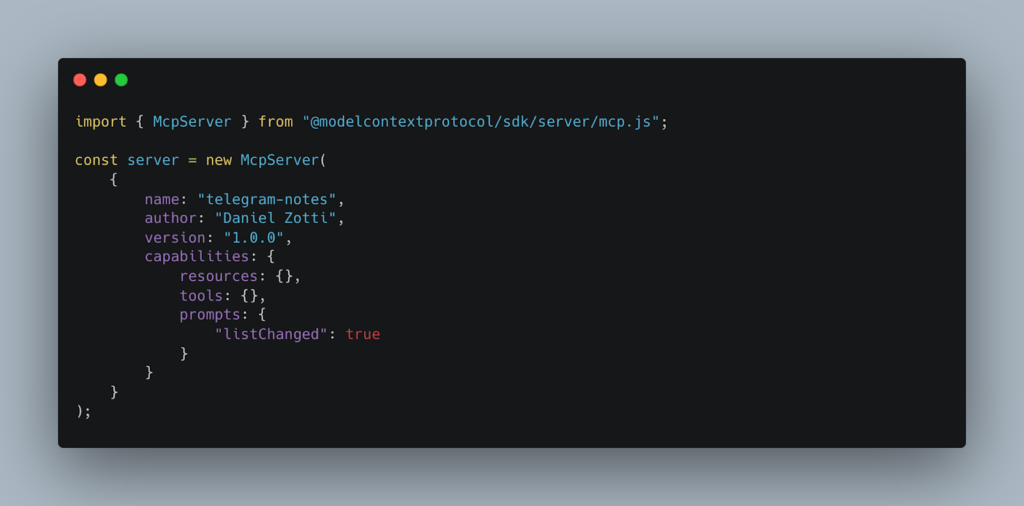
McpServer: The base class for implementing the MCP server is imported. The configuration object defines important metadata such as name and version, which the client agent will use to identify and describe the server.StdioServerTransport: The MCP protocol defines how information should be exchanged. In this case, we chooseStdioServerTransport, which uses standard input/output streams (stdin/stdout) for communication. This is a common mode for servers that run as child processes or are integrated into local development environments such as an IDE (e.g., VS Code).
Definition of the send-note tool
The key operation is registering the tool, which we will call send-note, using the server.tool() method.
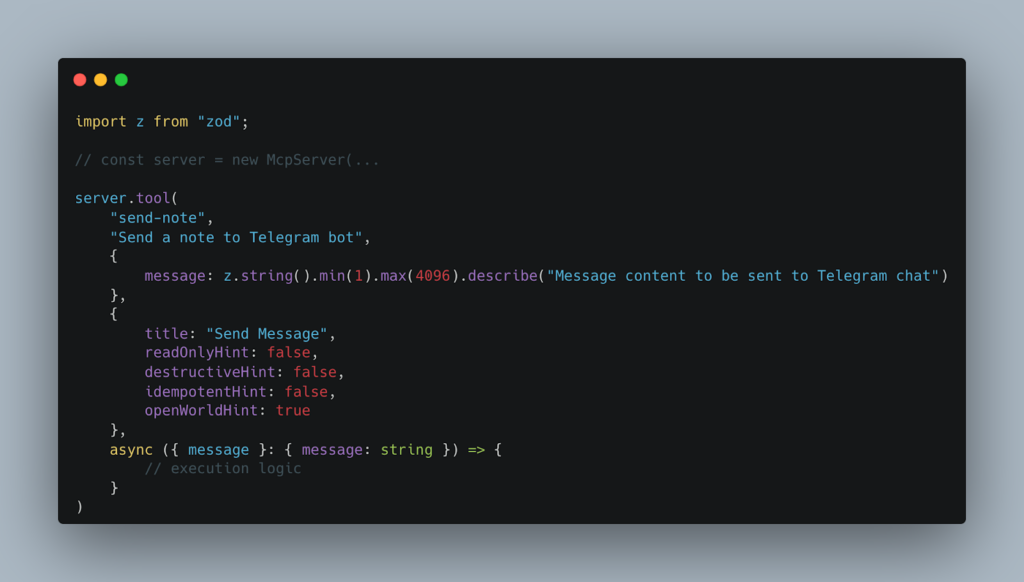
- Signature (Zod Schema): The MCP Server uses the Zod library (z in the example) to rigorously and typed define the inputs that the tool expects. In this case, a single
messageparameter is required, which must be a string with a minimum length of 1 and a maximum length of 4096 characters (Telegram’s standard limit for messages). This typing is essential for the AI Agents’ ability to construct the correct function calls. - Metadata (Hint): The object containing title,
readOnlyHint,destructiveHint, etc., provides semantic information to the AI agent. The settingopenWorldHint: true indicates that the execution of this tool may have external effects on the world (in this case, sending a message), a crucial detail for the agent’s decision-making logic.
Tool Execution
The body of the async function defines the logic that is executed when the tool is invoked:
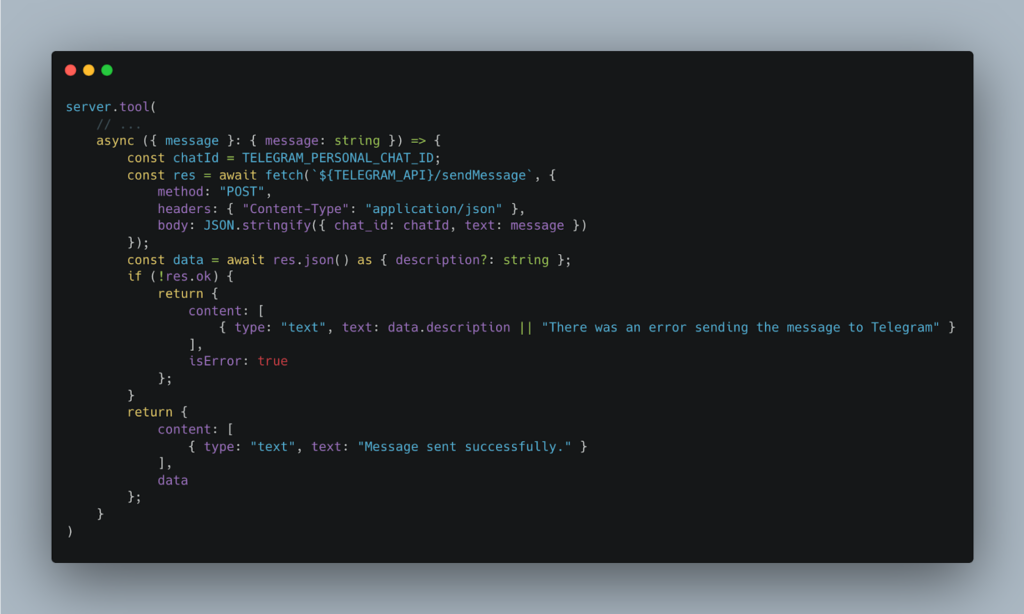
- URL construction: The
TELEGRAM_APIenvironment variable contains the base URL for theTelegram API(which includes the bot token). The request is directed to the /sendMessage method. - Fetch call: A
POSTrequest is made with aJSONpayload that includes thechat_id(the recipient, taken from the environment variables) and the text (the message content, passed as a parameter from the MCP Client). - Error handling: The code checks the success of the response (
if (!res.ok)). If it fails, it returns an object that includesisError: trueand a readable error message (content), following the standard MCP response format. If successful, it returns the confirmation message.
Environment Variable Integration
The env.ts file (implicit in the use of TELEGRAM_API and TELEGRAM_PERSONAL_CHAT_ID) is responsible for reading and validating sensitive credentials from the .env file. This approach decouples the server logic from specific configurations and ensures that keys are not accidentally committed to version control.
Architecture and Workflow
To understand how the MCP Server fits into the broader architecture, let’s consider the typical workflow:
- Startup: The MCP Server is started (e.g., with
npm start)and listens on theStdioServerTransportchannel. - Discovery (Client): An AI Agent (MCP Client), such as an LLM model, connects to the server (or uploads its tool description) and discovers the existence of the
send-notetool, along with its description and parameters. - Decision (AI Agent): The AI Agent receives a prompt from the user, for example: “Remind me to call Mom tomorrow morning at 9”. The agent recognizes that the appropriate action is to “send a note” and constructs the call to the
send-notetool with themessageparameter: “Remind me to call Mom tomorrow morning at 9”. - Invocation (MCP): The Agent sends a formatted invocation message via
stdinto the MCP Server. - Execution (Server): The MCP Server receives the message, extracts the
messageparameter, and executes its associated callback, which is theHTTPrequest to the Telegram API. - Confirmation (Server and Client): The Server receives the response from Telegram, encapsulates it in an MCP response (success/error), and sends it to the AI Agent via
stdout. The AI Agent can then use this confirmation to inform the user.
Advantages and Conclusions
The implementation of an MCP Server for Telegram notifications demonstrates the power and technological advantages brought by this protocol, including:
- Strong Typing (TypeScript): The combination of TypeScript and Zod ensures that input parameters are validated before being used, reducing runtime errors caused by invalid inputs from AI agents or clients.
- Decoupling: The AI Agent does not need to know the Telegram API, Token, or Chat ID. It only needs to know the signature of the send-note tool. The MCP Server acts as an abstraction layer that handles complex logic and credential management.
- Future scalability: Adding new features (e.g., send-image, create-reminder) only requires registering a new tool on the server, without having to modify the AI Agent’s logic.
The Potential of MCP
Although the Telegram example is simple, the MCP Server philosophy is applicable to much more complex scenarios:
- Business automation: Expose tools for creating tickets in Jira, updating records in Salesforce, or sending queries to corporate databases.
- Hybrid integration: Enable an AI Agent to interact with legacy (outdated) systems in a standardized way.
- Resource management: Provide controlled access to data or files (the concept of resources in MCP), such as documents in Drive or spreadsheets.
The MCP Server is not just an integration pattern; it is an essential bridge that transforms language models from simple text engines into active agents capable of performing meaningful actions in the digital world.
Using the newly created MCP Server
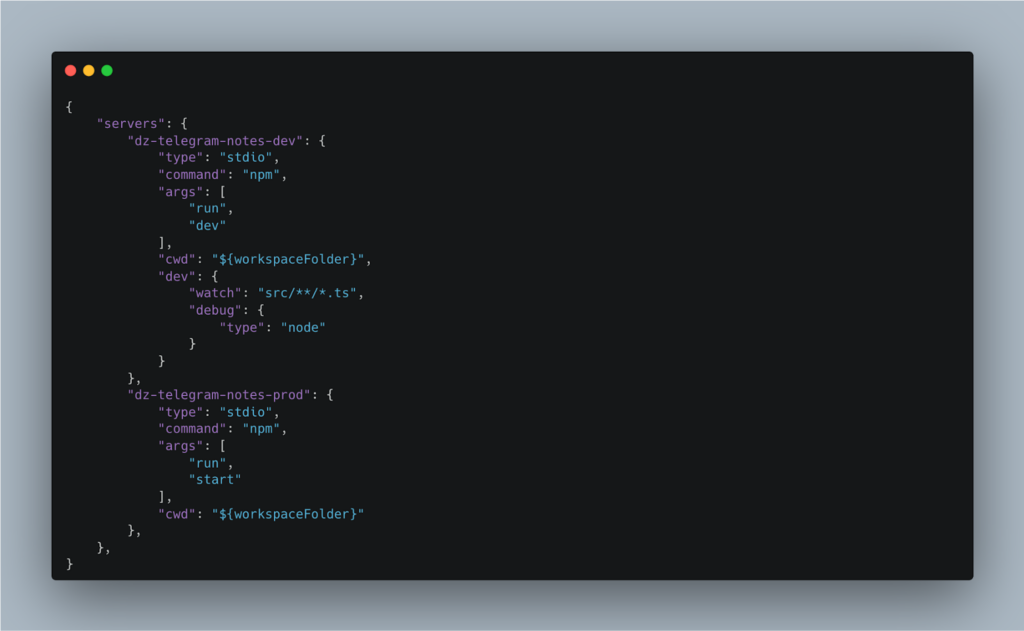
Using in VSCode
Create a file called mcp.json in the .vscode folder and edit it as follows:
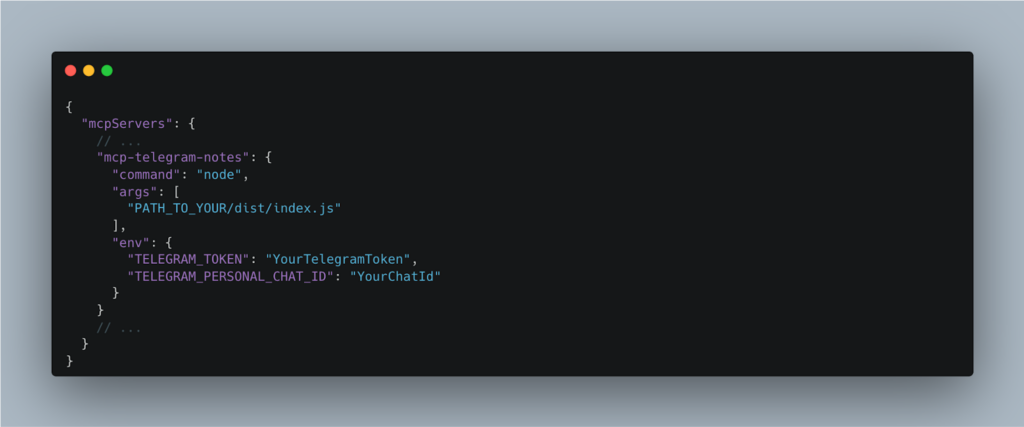
Using in Claude Desktop
Edit the claude_desktop_config.json file as follows:
Useful Resources
- GitHub Repo
- Official documentation for learning more about the MCP (Model Context Protocol)
- Introduction to Telegram Bots for developers
- Documentation for Telegram Bot APIs
Main Author: Daniel Zotti, Team Leader e Tech Leader Frontend @ Bitrock