

A practical exploration of building native Android apps with Swift
Can Swift Become an Alternative when Evaluating Cross-Platform Apps?
In today’s digital transformation landscape, companies find themselves at a constant crossroads: release speed or native quality? Historically, choosing native development meant doubling efforts (and costs) by maintaining separate teams for Swift (iOS) and Kotlin (Android). Conversely, traditional cross-platform frameworks have often introduced compromises in performance and User Interface fidelity.
But what if we could break down these barriers without giving up the power of Swift? Recently, the evolution of Swift-to-Java interoperability tools has opened a “third way”: the ability to run Swift code natively on Android. At Bitrock, as a leading partner in IT innovation, we constantly explore these emerging technologies to provide our clients with solutions that maximize code reuse without sacrificing technical excellence.
In this article, we will analyze a practical experiment: integrating Swift business logic within a modern Android architecture. Is it truly possible for Swift to become the definitive alternative for enterprise cross-platform applications?
The Cross-Platform Question
Mobile development teams face a persistent challenge: how do you deliver native-quality apps across iOS and Android without duplicating effort?
The traditional approaches all have trade-offs:
- Pure native development delivers the best performance and UX, but requires maintaining two separate codebases
- Cross-platform frameworks like Flutter and React Native enable code sharing but often compromise on native feel or performance
- Kotlin Multiplatform shares business logic while keeping UI native, but requires Android-first expertise
Swift for Android introduces the option to extend iOS-first development to Android, valuable for teams with established Swift codebases and expertise.
What We Built
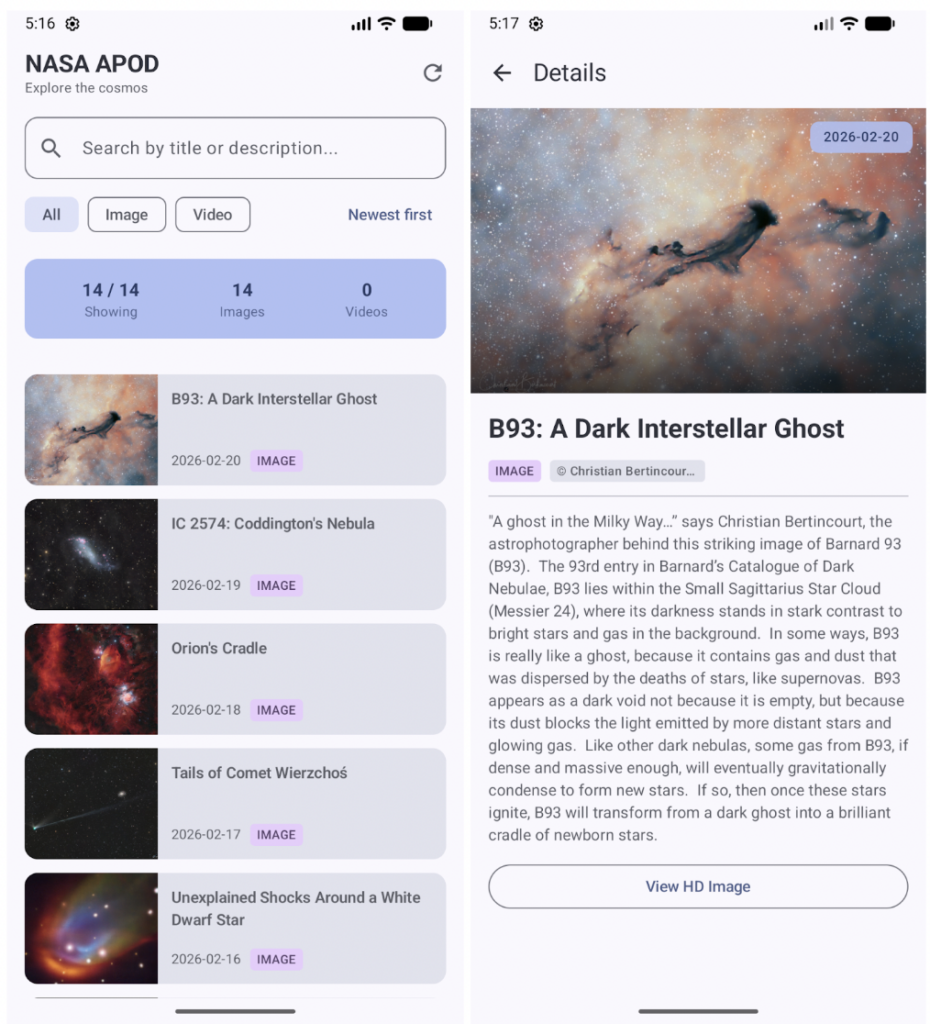
Our example project demonstrates Swift for Android in a production-like scenario:
Features implemented:
- Real-time data fetching from NASA’s API
- Search and filtering capabilities
- Full detail views with HD image support
- Material Design 3 UI with Jetpack Compose
Architecture: The application splits responsibilities between the Swift layer, which handles API communication, data transformation, filtering, and search, and the Android layer, which takes care of the UI presentation.
This separation mirrors how production apps might structure shared business logic with native UI.
How the Swift-Android Integration Works
The bridge between Swift and Android consists of automatic code generation. A tool called swift-java analyzes your Swift APIs and generates Java bindings that Android code can call directly.
From Swift:
public class NASAClient {
public func getTodayApod() async throws -> ApodData {
// Swift implementation
}
public func search(_ apods: [ApodData], query: String) -> [ApodData] {
// Filtering logic
}
}
To Kotlin:
val nasaClient = NASAClient(apiKey)
// Swift async becomes Kotlin coroutine
val apod = nasaClient.getTodayApod().await()
// Swift functions called directly
val results = nasaClient.search(allApods, "galaxy")
This bridge handles memory management, type conversion, and async operations automatically.
Key Technical Insights
1. Type Safety Across Languages
Swift’s type system translates cleanly to Java/Kotlin:
- Swift optionals (
String?) become JavaOptional<String> - Swift structs map to Java classes with getters
- Swift async/await bridges to
CompletableFuture, which integrates seamlessly with Kotlin coroutines
2. Platform-Specific Optimization
Swift code can adapt to each platform using conditional compilation:
#if os(Android)
// Use Android-optimized HTTP client
AsyncHTTPClient
#else
// Use iOS URLSession
URLSession
#endif
The same business logic runs everywhere, but HTTP networking, file I/O, and other platform-specific operations can be optimized for each environment.
Challenges to Consider
Build Complexity
Setting up the Swift toolchain for Android requires understanding both ecosystems. The initial configuration has a learning curve, but subsequent builds are straightforward. Sometimes some workarounds might be needed, like deleting cached build folders, which can be a burden to development speed.
Platform Limitations
Not all Swift features translate to Java. Complex enum associated values, certain protocol features, and some advanced Swift constructs don’t have direct Java equivalents (yet). A list of supported features is provided by the swift-java team.
Ecosystem Maturity
The Swift for Android SDK is still in early development and might not be ideal for important enterprise projects yet, but it’s a tool worth checking out to understand how the Swift team is evolving.
Comparison with Alternatives
vs. Kotlin Multiplatform
Both enable sharing business logic with native UI. KMP is Android-first; Swift for Android is iOS-first. Choose based on your team’s primary expertise.
vs. Flutter/React Native
These frameworks share entire applications, including UI. Native implementations are occasionally needed for edge-cases.
Our Perspective
After playing with Swift for Android, we saw that it still has some rough edges that need to be evened out before implementing it on production-ready apps. We expect it to evolve and become a valuable tool for teams that work more often on iOS/Apple platforms than Android or that need to bring existing logic written in Swift to Android.
On the other hand, for teams starting fresh or working primarily in Android, Kotlin Multiplatform or native development likely makes more sense.
Conclusion
As Swift continues evolving beyond Apple’s ecosystem, we expect:
- Improved tooling and developer experience
- Broader Swift package compatibility with Android
- Better integration with Android development workflows
The technology is being actively worked on, and Apple seems to be investing in expanding Swift onto even more platforms. Whether Swift for Android becomes mainstream or remains a specialized tool, it expands the options available to mobile development teams.
Are you ready to optimize your mobile strategy and slash development costs?
Contact the Bitrock experts today for a personalized consultation on your mobile architecture.
Main Author: Mattia Contin, iOS Developer @ Bitrock